Feather docs
A whisper-light Chrome extension that watches Discord for new messages in real time — firing webhook alerts, logging everything to Supabase, and showing a clean overlay indicator right on the Discord page.
How the pieces connect
Three scripts run independently and communicate via Chrome's message passing API:
| Script | Runs in | Responsibility |
|---|---|---|
| content.js | Discord tab | Watches DOM, detects messages, shows overlay, extracts metadata |
| background.js | Service worker | Receives events, fires webhook, writes to Supabase, relays popup commands |
| popup.js | Toolbar popup | Displays stats + log, sends toggle/reset commands, handles export |
File structure
Installation
Feather is a private unpacked extension — it never goes through the Chrome Web Store. You load it directly from your files. Works the same in Chrome, Edge, Brave, and Arc.
icons/ folder in a single directory. Configure your credentials in background.js before loading — easier than reloading twice.C:\Users\you\feather\. Place all six files and the icons\ subfolder inside it. Don't move the folder after loading or the extension will break.
background.js in any text editor. Fill in the three constants at the top — your webhook URL, Supabase URL, and Supabase anon key. Save the file. See Configuration for details.chrome://extensions and press Enter.
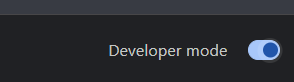
feather\ folder and click Select Folder.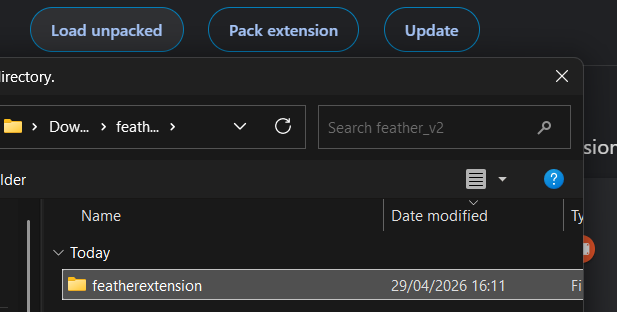


Reloading after edits
Every time you change any file: go to chrome://extensions, click the ↺ refresh icon on the Feather card, then reload the Discord tab. Chrome does not auto-reload unpacked extensions.
~/Documents/feather/. Place all six files and the icons/ subfolder inside. Don't move it after loading.background.js in TextEdit, VS Code, or any text editor. Fill in the three constants at the top. See Configuration.chrome://extensions in Chrome's address bar.~/Documents/feather/ and click Open.~/.local/share/feather/.mkdir -p ~/.local/share/feather cp -r /path/to/feather/* ~/.local/share/feather/
nano ~/.local/share/feather/background.js
chrome://extensions.~/.local/share/feather/, click Open.~/snap/chromium/current/feather/ or install Chrome via the official .deb package instead.Configuration
Everything lives in four constants at the very top of background.js. Open the file, fill them in, save, reload the extension. That's it.
// ── background.js — top of file ────────────────────────── const DISCORD_WEBHOOK_URL = "https://discord.com/api/webhooks/YOUR_ID/YOUR_TOKEN"; const SUPABASE_URL = "https://your-project-id.supabase.co"; const SUPABASE_ANON_KEY = "eyJhbGciOiJIUzI1NiIsInR5cCI6IkpXVCJ9..."; const SUPABASE_TABLE = "feather_logs"; // change if you renamed your table
chrome://extensions, click the ↺ icon on the Feather card, then reload your Discord tab.Both integrations are fully optional. Leave a value as the placeholder string and that integration is silently skipped — no errors. The popup's Overview tab shows live status dots so you can see what's configured.
Chrome storage keys
Feather stores runtime state in chrome.storage.local. You never manage these directly, but it's useful to know they exist:
true on first run.{ webhook: boolean, supabase: boolean } — written by background.js on startup.Wipe all of this cleanly using the Full reset button in the popup Settings tab.
manifest.json — why host_permissions matter
Chrome MV3 requires outbound fetch() targets to be explicitly listed in host_permissions. Without this, requests to Supabase and Discord are silently blocked from the service worker.
"host_permissions": [ "https://discord.com/*", "https://*.supabase.co/*" ]
Both are already in the current manifest.json. Don't remove them.
Webhook
On every detected message, Feather fires a POST to a Discord webhook URL with the author, channel, a message preview, and the running count.
Getting a webhook URL
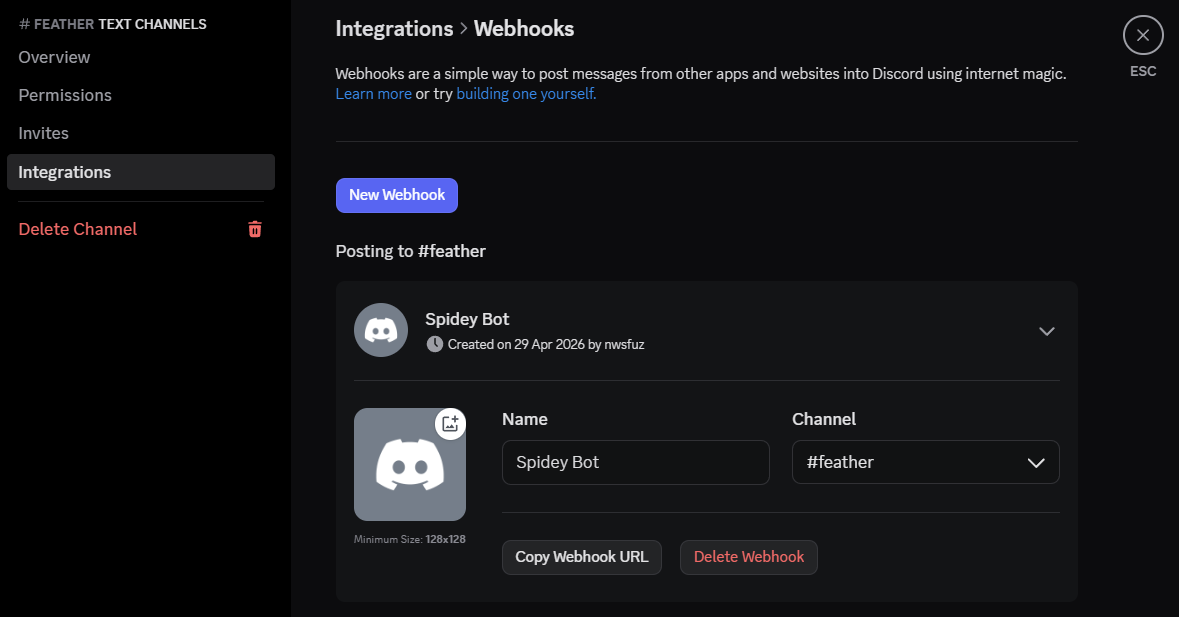
https://discord.com/api/webhooks/1234567890/abc123xyz...DISCORD_WEBHOOK_URL to this value and reload the extension.What the webhook message looks like

Author: username123
Channel: general
Message: hey has anyone seen the new update yet
Total count: 7
Message content is capped at 200 characters. For full content, use Supabase instead.
Testing your webhook
curl -X POST YOUR_WEBHOOK_URL \
-H "Content-Type: application/json" \
-d '{"content": "Feather test 🪶"}'
If your logging channel gets a message, the URL is correct.
Supabase
Every detected message is inserted as a row into your Supabase database — a permanent, queryable log of everything Feather has ever seen.
manifest.json already includes https://*.supabase.co/* — do not remove it.Step 1 — Create a project
Go to supabase.com, sign in, click New project. Give it a name, set a database password, pick a region. Free tier is more than enough — 500MB and unlimited API calls.
Step 2 — Create the table
In your project sidebar, click SQL Editor. Paste this block and click Run:
create table feather_logs ( id bigint generated always as identity primary key, author text, content text, channel text, count integer, timestamp timestamptz default now() ); -- Enable row-level security (required to use the anon key) alter table feather_logs enable row level security; -- Allow the anon key to INSERT rows create policy "Allow anon insert" on feather_logs for insert to anon with check (true); -- Allow the anon key to SELECT rows create policy "Allow anon select" on feather_logs for select to anon using (true);
Step 3 — Get your credentials
In your project sidebar go to Project Settings → API:
| Field | Where | Looks like |
|---|---|---|
| Project URL | Settings → API → Project URL | https://abcdefgh.supabase.co |
| anon / public key | Settings → API → Project API keys | eyJhbGci... (long JWT) |
Step 4 — Paste into background.js
const SUPABASE_URL = "https://abcdefgh.supabase.co"; const SUPABASE_ANON_KEY = "eyJhbGciOiJIUzI1NiIsInR5cCI6IkpXVCJ9..."; const SUPABASE_TABLE = "feather_logs";
Step 5 — Verify it's working
Trigger a detection, then go to Table Editor → feather_logs in Supabase. A new row should appear within one second.
Useful queries
-- All messages, newest first select timestamp, author, channel, content from feather_logs order by timestamp desc; -- Messages per author (leaderboard) select author, count(*) as total from feather_logs group by author order by total desc; -- Last 24 hours only select * from feather_logs where timestamp > now() - interval '24 hours' order by timestamp desc; -- Search by author select * from feather_logs where author ilike '%username%' order by timestamp desc;
Popup UI
Click the Feather icon in the Chrome toolbar to open the popup. Three tabs — Overview, Log, and Settings — all updating live as messages come in.
Overview tab
| Element | What it shows / does |
|---|---|
| Status dot | Green pulsing = live and detecting. Grey = paused. |
| Count number | Total messages detected this session. Bumps on new message. |
| Active toggle | Enable or pause detection. Syncs to the Discord overlay immediately. |
| Clear button | Resets count to 0 and clears the deduplication ID set. |
| Authors stat | Number of unique authors seen since last clear. |
| Webhook badge | ● configured if DISCORD_WEBHOOK_URL is set. |
| Discord pill | Green dot = a Discord tab is active. Red = not found. |
Log tab
Shows the last 50 detected messages in reverse chronological order from feather_recent. Each entry shows author (green mono), channel (blue pill), time (HH:MM), and message preview up to 200 characters.
Clear all wipes the local log. This does not delete rows from Supabase.
Settings tab
| Item | Description |
|---|---|
| Version | Current extension version number. |
| Keyboard toggle | Reminds you the shortcut is Alt Q. |
| Webhook status | Whether DISCORD_WEBHOOK_URL is configured. |
| Supabase status | Whether SUPABASE_URL is configured. |
| Export log as JSON | Downloads feather-export-{timestamp}.json with full local log and session count. |
| Full reset | Clears all chrome.storage.local data. Requires confirmation. Does not touch Supabase. |
Detection Logic
How Feather identifies real messages, suppresses false triggers, deduplicates, and extracts author and channel metadata — all without touching the Discord API.
Identifying a message node
Feather runs a MutationObserver on document.body with { childList: true, subtree: true }. Every added node is checked against three criteria:
<li> with this attribute. Primary signal, most reliable.<li> in certain UI states.Channel switch suppression
When you switch channels, Discord bulk-inserts ~50 historical messages. Feather uses two independent layers:
| Layer | Mechanism | Cooldown |
|---|---|---|
| URL poller | Checks location.href every 150ms. Any URL change immediately arms a cooldown. | 2000ms |
| Burst detector | Counts message nodes per callback. 3+ nodes in a single callback = suppressed + cooldown re-armed. | 2000ms |
If you're in an extremely active channel you can increase BURST_LIMIT in content.js:
// content.js — near the top const BURST_LIMIT = 5; // raise if false suppressions happen const NAV_COOLDOWN = 2000; // ms to ignore after URL change
Deduplication
Discord uses optimistic rendering — your message appears instantly, then gets replaced with the server-confirmed version. Feather maintains a Set of seen data-list-item-id values, capped at 500 entries, and skips data-is-local-message="true" nodes entirely.
Author extraction
Discord groups consecutive messages — only the first shows a username header. Feather handles this by first looking for [class*="username_"] within the node, then walking backwards through previous messages to find the most recent username header above it, falling back to "unknown".
Channel name extraction
document.querySelector('h3[class*="title_"]')
  || document.querySelector('[class*="channelName_"]')
  || document.querySelector('h1[class*="title_"]')
Each tab tracks its own channel independently.
Shortcuts
One keyboard shortcut. Works anywhere on discord.com as long as the Discord tab is focused.
content.js — look for the keydown event listener near the bottom of the file.Troubleshooting
Most issues come down to one of five things. Work through each checklist below.
Overlay doesn't appear on Discord
2. Check that Feather is enabled at
chrome://extensions.3. Open Discord's DevTools (F12) → Console → look for Feather errors.
4. Make sure you're on
discord.com not the desktop app.
Popup toggle / reset does nothing
chrome://extensions → Feather → click the service worker link.2. Check Console for errors. A missing
discordTabs variable is the usual cause.3. Click ↺ to reload the extension, then reload the Discord tab.
4. Check the Discord tab's DevTools Console for message-passing errors.
Webhook messages not arriving
DISCORD_WEBHOOK_URL is set (not the placeholder).☐
manifest.json includes "https://discord.com/*" in host_permissions.☐ Background DevTools shows no
[Feather] Webhook failed: error.☐ Test the URL directly with
curl (see the Webhook page).
Supabase rows not appearing
SUPABASE_URL and SUPABASE_ANON_KEY are correct (no trailing slashes).☐
manifest.json includes "https://*.supabase.co/*" in host_permissions.☐ The
feather_logs table exists — re-run the SQL from the Supabase page.☐ Both RLS policies exist.
☐ Background DevTools shows no
[Feather] Supabase log failed: error.
Channel switches still trigger false detections
content.js and increase BURST_LIMIT from 3 to 5, or increase NAV_COOLDOWN from 2000 to 3000. Reload the extension and Discord.
Messages being double-counted
chrome://extensions — if Feather appears twice, you've loaded it from two different folders. Remove the duplicate.
Opening the background service worker DevTools
[Feather] prefixed logs and errors appear here.